
Amazon Great Summer Sale 2026 is LIVE and crores of Indians are ready to clear their wishlist. Red ‘Limited Time Deal’ tags and tempting discount offers make us think, “Maybe it’ll never get cheaper than this again!” But have you ever noticed that the laptop which was priced at Rs 45,000 yesterday, is still available for Rs 45,000 with an MRP of Rs 55,000 and a discount of Rs 10,000 as soon as the sale starts? To end this game of ‘fake discount’, the company has its own tool available on Amazon. Because of this, users do not need to check the price by visiting unsafe third-party apps, extensions or websites.
Below we will tell you how to use this hidden tool of Amazon, so that you do not fall prey to any brand in this sale and can only avail the benefits of the genuine deal.
What is Amazon Price History Tool?
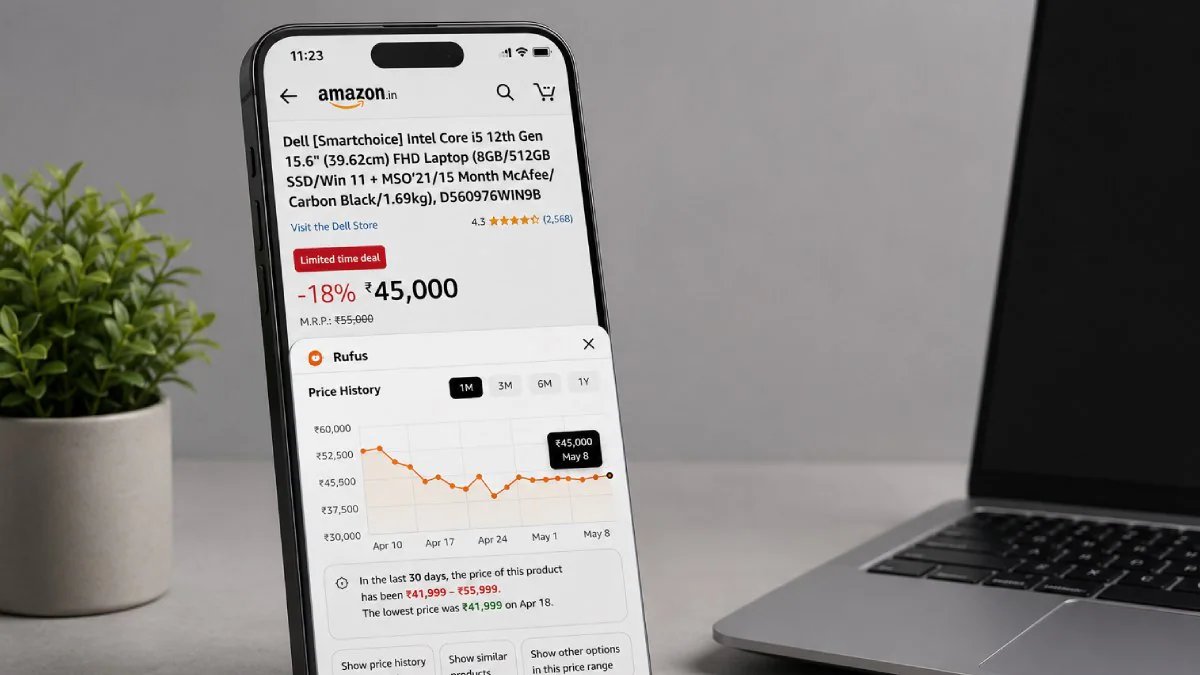
Amazon recently updated the “Price Insights” feature on its app and website. This tool shows you the price graph of any product from last 30 days (1M) to 365 days (1Y). This lets you immediately know what the price of the product you are buying today at the mentioned price was last week.
How to recognize the real deal in a sale? (Step-by-Step)
- Open product page: Open the product you want to buy on the Amazon app or website.
- Look below the price section: Just to the right or below the price you’ll see a small ‘Price History’ text.
- Click on Price History: By clicking here, a pop-up of Rufus AI will open, where the price history will be shown along with the graph.
- Read Summary: Rufus AI automatically gives a summary, which tells how much the price of this item has been in the last 30 days and will also tell how expensive or cheap it is now compared to the last lowest price.
- See also graph: You can see the graph below to find out for yourself. Here you can choose 1M, 3M or 1Y, which means 1 month, 3 months and 1 year.
- Ask Rufus AI a question: You can also ask pre-built questions below the graph, like ‘Show price history for last 90 days’, ‘Show similar devices’, ‘Show other devices at similar price’ etc. Or you can send your own question by writing below.
Why is it better than third-party apps?
- You don’t need to give your browsing data to any unknown extension.
- Since this data is directly from Amazon, there is less scope for error in it.
- Be it mobile app or mobile browser, this feature works easily everywhere.
Latest Tech News, smartphone review and popular Mobile Gadgets 360 for exclusive offers on Android Download the app and follow us Google News Follow on.